Security Architecture
A technical overview of how we protect your data.
Architecture Overview
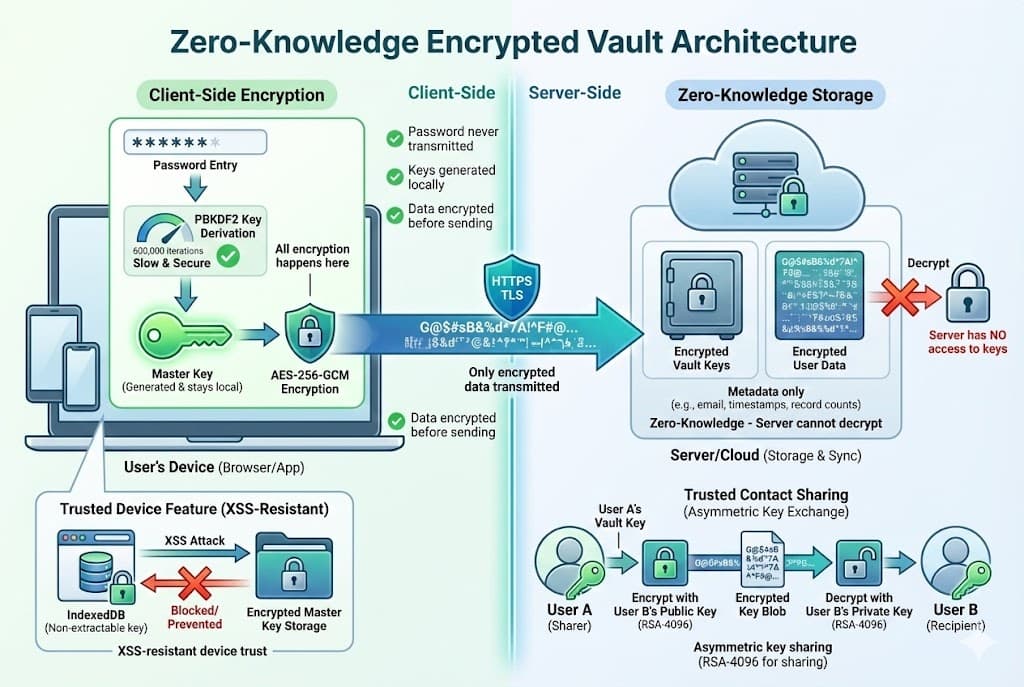
Zero-knowledge architecture: your data is encrypted on your device before it ever reaches our servers.
Zero-Knowledge Architecture
Prepare That Day uses a zero-knowledge architecture. This means:
- All encryption and decryption happens client-side in your browser
- Our servers never see plaintext data or decryption keys
- Even with full database access, your data remains unreadable
Key Hierarchy
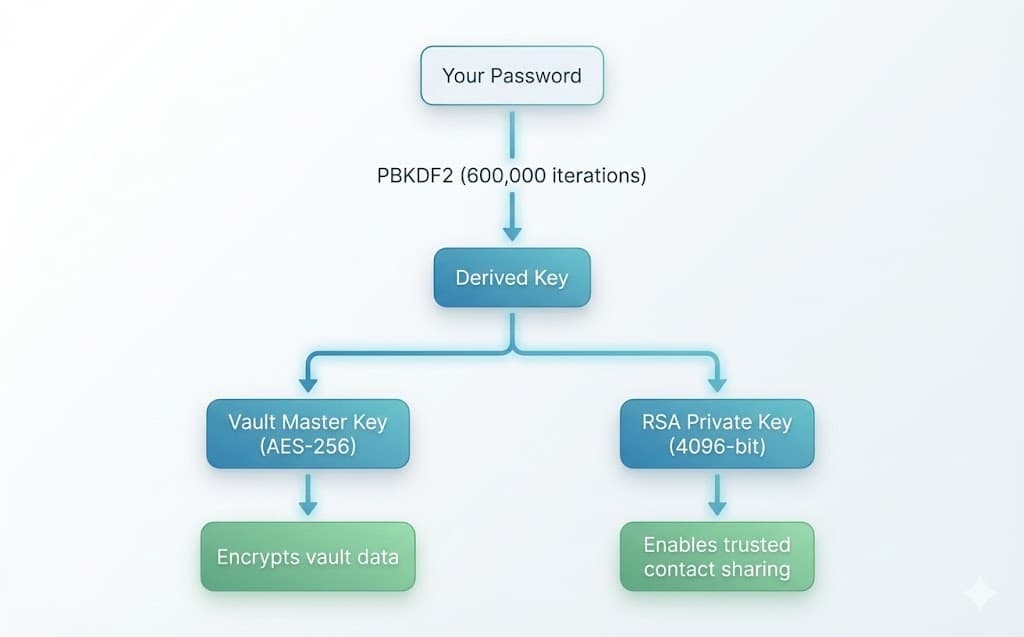
Your password never leaves your device. Instead, it's used to derive encryption keys locally:
Cryptographic Standards
We use industry-standard algorithms implemented via the Web Crypto API:
| Purpose | Algorithm | Details |
|---|---|---|
| Password Derivation | PBKDF2-SHA256 | 600,000 iterations, 256-bit output |
| Vault Data Encryption | AES-256-GCM | Unique IV per field, authenticated encryption |
| Key Sharing | RSA-OAEP | 4096-bit keys, SHA-256 hash |
| Trusted Device Keys | AES-256-GCM | Non-extractable CryptoKey in IndexedDB |
How Data Flows
1Account Creation
- You create a strong password (validated by zxcvbn)
- A random 256-bit Vault Master Key is generated in your browser
- An RSA-4096 key pair is generated for sharing capabilities
- Your password is run through PBKDF2 to derive an encryption key
- The Master Key and RSA Private Key are encrypted with this derived key
- Only the encrypted keys (unreadable blobs) are sent to our servers
2Unlocking Your Vault
- You enter your password
- Encrypted keys are fetched from the server
- Your password derives the decryption key via PBKDF2
- Keys are decrypted locally and held in memory
- You can now read and write encrypted vault data
3Encrypting Vault Data
- Each field is encrypted individually
- A unique random IV (initialisation vector) is generated per field
- AES-GCM encrypts the data with your Master Key
- The encrypted blob + IV is stored on our servers
Trusted Contact Key Sharing
When you share access with a trusted contact, your Master Key is securely transferred without ever being exposed:
- Your decrypted Master Key is held in memory
- We fetch your trusted contact's RSA Public Key
- Your Master Key is encrypted with their public key (RSA-OAEP)
- This encrypted key is stored — only they can decrypt it with their private key
- When they access the vault, they decrypt with their private key
Result: Your key is shared securely. We never see it in plaintext.
Trusted Device Security
For convenience, you can trust a device to skip password entry. Here's how it stays secure:
- A non-extractable AES-256 key is generated via Web Crypto API
- This key is stored in IndexedDB — it cannot be exported or stolen via JavaScript
- Your Master Key is encrypted with this device key
- The encrypted Master Key is stored server-side with a device ID
- On return, the device key decrypts your Master Key locally
XSS Protection: Non-extractable keys cannot be stolen even if an attacker injects malicious JavaScript. The Web Crypto API prevents any code from reading or exporting these keys.
Device trust expires after 30 days for additional security.
Additional Security Measures
Password Strength
Enforced via zxcvbn (score 4 required)
Brute-Force Resistance
600,000 PBKDF2 iterations slow down attacks
Memory Safety
Keys held only in React context, cleared on logout
Transport Security
All data transmitted over HTTPS/TLS
What This All Means
Database breach? Attackers get encrypted blobs they can't read.
Server compromise? No plaintext data exists on our servers to steal.
Malicious employee? Even with full access, they cannot decrypt your data.
Government subpoena? We can only provide encrypted data we cannot read.
Your security doesn't depend on trusting us. It depends on mathematics.
Questions about our security? Contact us at [email protected]